How to Find the BPM of a Song by Ear, by Count or by File
Here is how to find the BPM of a song four ways, sorted from the quickest to the most precise: tapping along, counting against a clock, reading an audio file, and lining the track up with a grid. The first two come with a grid you can play, so you can test yourself before you trust your hands.
- Updated Nov 22, 2026
- 8 min read
The short answer: tap along with the beat at least eight times and average the gaps, or count the beats in 15 seconds and multiply by four. If you have the track as a file, let a detector read it, then decide between the detected tempo, half of it and double it by ear.
The quickest way to find the BPM of a song: tap along for under a minute
BPM means beats per minute: how many times you would nod your head in sixty seconds. You almost never need the full minute, because the beat repeats, so a short sample multiplied up gives the same answer.
The fastest way is to tap. A tap tempo counter turns the gaps between your taps into a number, and any phone with a stopwatch works as a backup. Practise on the grid below before you try it on a real record.
Tap the main beats your head wants to follow, usually where the first kick and the snares land, not every hi hat. Skip the first two or three taps too, since nobody locks in on the first one.

01Tap along: practice on a hip hop groove
Press Play and tap a key or the table four times per bar: on the first kick, the snare, the gap halfway between and the second snare. Keep going for eight to twelve taps, then check your number against the answer under the grid.
If your taps are spread over a range of five BPM or more, keep going: the average settles as you add taps. Tapping on the snare alone gives you half the count, which is a mistake worth noticing now.
| Kick | ||||||||||||||||
|---|---|---|---|---|---|---|---|---|---|---|---|---|---|---|---|---|
| Snare | ||||||||||||||||
| Closed hat |
Show the answer for groove 1
90 BPM. If you got 45, you tapped once per snare; if you got 180, you tapped every closed hat.
How to count BPM in a song with a phone timer
Counting is slower than tapping but needs nothing beyond a clock, so it works in a car, at a gig or in a dance class. Start the timer on a beat you call one, count every beat until the timer stops, then multiply.
| Count for | Multiply by | One beat off | Good for |
|---|---|---|---|
| 6 seconds | x 10 | 10 BPM | A rough guess while the song plays |
| 10 seconds | x 6 | 6 BPM | Telling a slow song from a fast one |
| 15 seconds | x 4 | 4 BPM | The usual choice: close enough to set a click |
| 30 seconds | x 2 | 2 BPM | Matching a drum machine or a DJ mix |
02Count for 15 seconds: practice on a pop groove
This groove alternates kick, snare, kick, snare on the main beats, while the closed hat plays twice as often. Count the kick and snare hits, the quarter notes, and ignore the hat; counting hats is how a 120 tune turns into 240.
Start the timer on a kick, count "one" on that same hit, and stop counting the moment the timer ends. Multiply by four and check the answer below.
| Kick | ||||||||||||||||
|---|---|---|---|---|---|---|---|---|---|---|---|---|---|---|---|---|
| Snare | ||||||||||||||||
| Closed hat |
Show the answer for groove 2
120 BPM, which is 30 beats in 15 seconds. A count of 29 or 31 gives 116 or 124: right ballpark, and the reason to count for 30 seconds when precision matters.
Pulling the tempo out of the audio file: how to get the BPM of a song you already own
03Read it with a detector
If the track sits on your computer as an MP3 or a WAV, a song bpm detector reads it for you. Expect a whole number in large type, then a more precise Exact value with one decimal. Open formats vary by browser; M4A, FLAC and OGG usually work as well.
Under the result sit three chips: Half-time, Detected and Double-time. The detector sometimes locks onto half or double the pulse you feel, so play the track, tap along once, and press the chip that matches your tap.
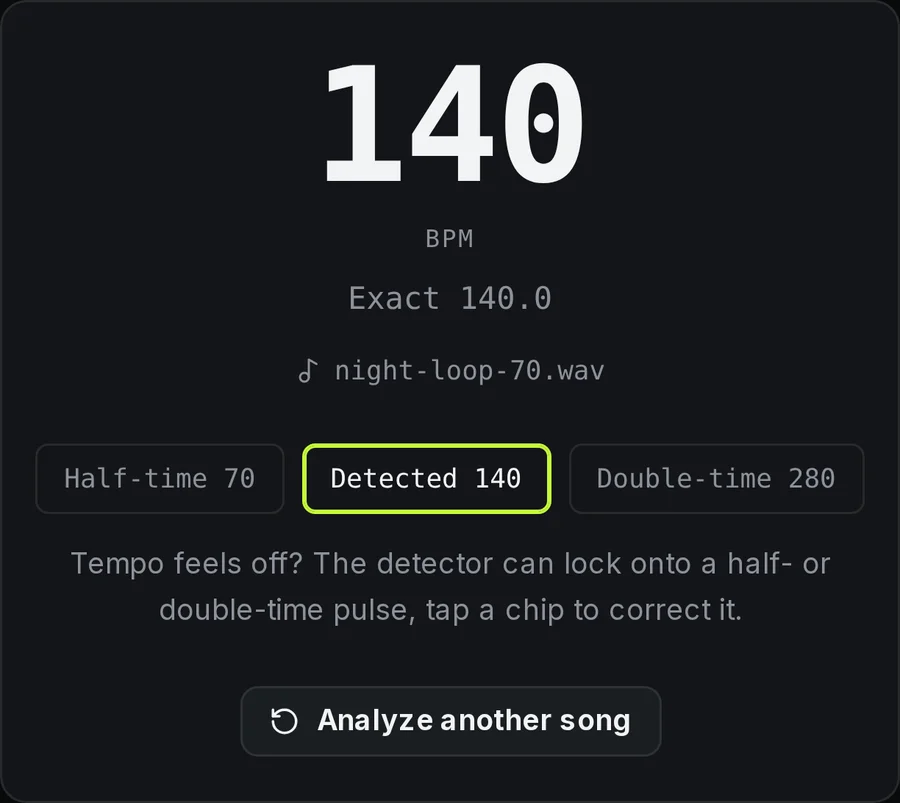
Drop one file and get its tempo, read in your browser with no upload and no account.
Open the BPM finder04Line it up with a DAW grid
For the most precise result, drag the audio into any DAW, set the project to your best guess and switch the metronome on. Line the first downbeat up with bar one and listen several minutes in.
If the click drifts ahead of the song, the project is too fast; if it falls behind, too slow. Change the tempo by one BPM, then by a tenth, until the click and the kick still land together at the last chorus.
Why the BPM you find for a song can read as two tempos: half time and double time
The most common surprise is a reading of exactly half or double what you expected. Neither is wrong; they are two ways of counting the same music, and genres like trap sit right on the line between them.
Play the Trap preset below. Clap on the snare and you will feel a slow, heavy 70; count every fourth closed hat and you land on 140.
| Kick | ||||||||||||||||
|---|---|---|---|---|---|---|---|---|---|---|---|---|---|---|---|---|
| Snare | ||||||||||||||||
| Closed hat | ||||||||||||||||
| Open hat | ||||||||||||||||
| 808 bass |
- Kick Steps 1, 8 and 11. Too uneven to count by.
- Snare Step 9 only, once per bar. Clap here and you count 70.
- Closed hat Sixteenth notes with two gaps. Every fourth hat gives 140.
- Open hat Fills the gaps in the hat roll.
- 808 bass Follows the kick, so it adds weight, not a pulse.
Producers usually file trap at 140 and call the slow feel half time, while a listener tapping the snare reports 70. The BPM finder chips exist for this: if it reads 140 and you want the felt tempo, tap Half-time; if a slow ballad reads 140, it probably locked onto the hats and Half-time is right too.
Pick the number for its job. To match a drum machine to the track either works, as long as your pattern is written the same way.
When song BPM drifts: live drummers, swing and tempo changes
A drum machine plays at one exact tempo for ever. A band does not, and songs recorded without a click can speed up by several BPM from the first verse to the last chorus.
Swing confuses detectors too, because the off beats arrive late and the tool may take them for a different pulse. Here are the readings that go wrong most often and what to do about each.
- The number is half or double what you feelTap along once, then pick the Half-time or Double-time chip that matches your tap.
- A swung or shuffled song reads unevenlyCount only the kick and snare on the main beats; the late off beats are swing, not tempo.
- A live recording gives a different number per sectionCount the section you plan to use for 30 seconds, or cut that part into its own file before detecting.
- The intro has no drums and the reading looks randomStart your count or your file where the drums enter; pads and vocals give a detector little to hold.
- The result has a decimal, like 127.8Round to 128 for a drum machine or metronome; keep the decimal only when you line audio up in a DAW.
Once you find a song's BPM, build a beat at that tempo
A tempo is only useful when something else runs at it. To practise an instrument or a routine against the track, set a free click that runs in your browser to the number and play the song next to it; if they drift apart after a minute, adjust by one BPM.
To build drums that fit, make a beat in your browser at the same tempo: type the number into the BPM field and copy where the kick and snare land in the song. Knowing what each drum and cymbal in a kit is called makes it easier to pick each one out by ear.
Tempo is half of what you need to work with someone else's song; the other half is the key, and identifying the key of a track by ear uses the same listen, test and correct habit you just practised. Now you know how to find the BPM of a song with nothing but a clock, and how to check a detector when it gives you two answers.
Song tempo questions: titles, streaming links, DJ apps and speed changes
Can I find the BPM of a song by typing its name?
Not with the BPM finder on this site: it reads an audio file you already have and does not look songs up by title or artist. For a track you only know by name, play it anywhere and tap or count along.
How do I get the BPM of a song on Spotify or YouTube?
The finder does not take links from Spotify, YouTube or any other site. Play the track through any speaker and use the tap or the 15 second count; both work on audio you cannot download.
Is BPM the same thing as the time signature?
No. BPM is how many beats pass in a minute, while the time signature says how many beats make one bar. A waltz and a rock song can share 96 BPM and still group their beats in threes and fours.
Why does my DJ software show a different number?
Every detector chooses which pulse to lock onto, and many fold results into a preferred range such as 70 to 140. A gap of exactly half or double is one tempo read two ways; a gap of one or two BPM is rounding or a tempo that drifts.
Can a song change tempo halfway through?
Yes. Live takes drift, ballads often slow at the end and some songs switch speed for a bridge. A file detector reports one figure for the whole track, so count the section you actually need.
How do I make a beat at the same BPM as a song?
Type the number into the BPM field of the drum machine on the homepage, which accepts whole numbers from 60 to 240. Play the song next to it and nudge the field one step at a time until the two stop drifting apart.