BPM Finder for Audio Files: Exact Tempo, Half Time and Double Time
Drop an MP3, WAV, M4A, FLAC or OGG file and the BPM finder reads its tempo right in your browser: a whole number, an exact figure to one decimal, and the half time and double time readings beside it, so a wrong octave takes one tap to fix.
- Five audio formats
- Measured on your device
- Files stay local
Your file is analyzed right here in your browser, nothing is uploaded to a server.
What the BPM finder reads from your file
The BPM finder listens for the regular hits in a recording, mostly kick, snare and other sharp attacks, and works out how many of those pulses fall in a minute. The answer is one tempo for the whole file.
Decoding happens through the Web Audio engine built into your browser, and the counting happens on your own machine too, which keeps a demo or an unreleased mix private. Like our other free tools for beat makers, it asks for no login.
Searches like “BPM for any song” usually mean looking a track up by name. This page cannot do that and takes no links; it only measures a file you have. For a song you can only stream, play it and tap along to set the click speed instead.
Tempo BPM finder results: when to pick half time or double time
Here is a real run on a 70 BPM loop with busy sixteenth note hats. The detector heard the hats and the backbeat as the pulse and said 140, which is exactly double.
- Rounded
- 140
- The big number, the tempo to the nearest whole BPM.
- Exact
- 140.0
- The same reading to one decimal, useful when a track sits between two whole numbers.
- Half-time
- 70
- Half the reading. Tap it when the song feels slow and heavy, as this loop does.
- Detected
- 140
- What the detector locked onto before any correction.
- Double-time
- 280
- Twice the reading. Tap it when the number feels sluggish against fast drums.
To decide, nod along and count your nods against a clock for ten seconds, then multiply by six. Whichever chip sits closer to that count is the BPM of the song as a listener feels it.
Three screens of the BPM finder, from dropped file to tempo
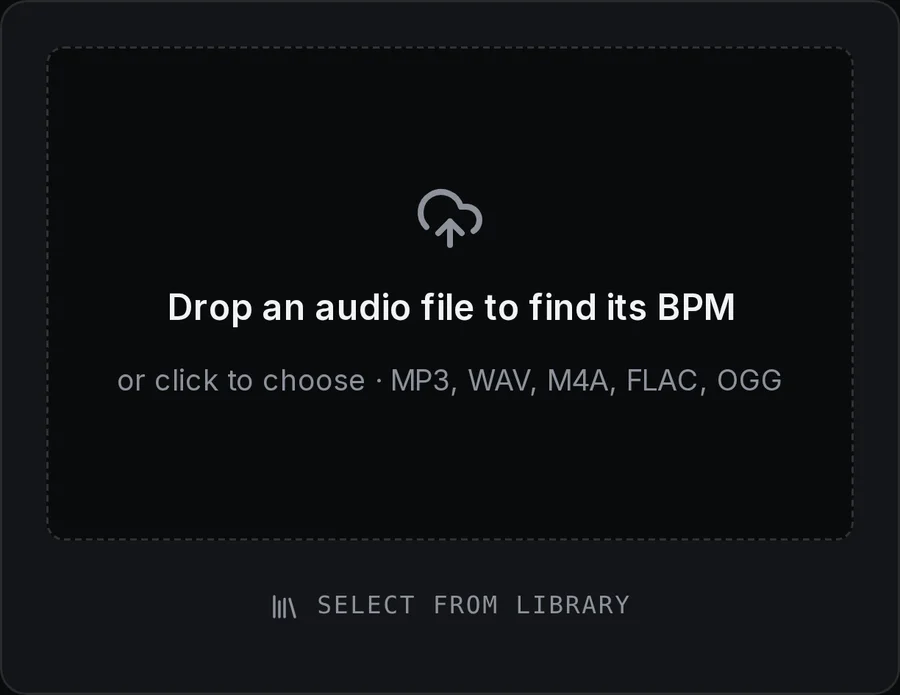
01Drop the file
Drag an audio file onto the box or click it to choose one. One file per run.
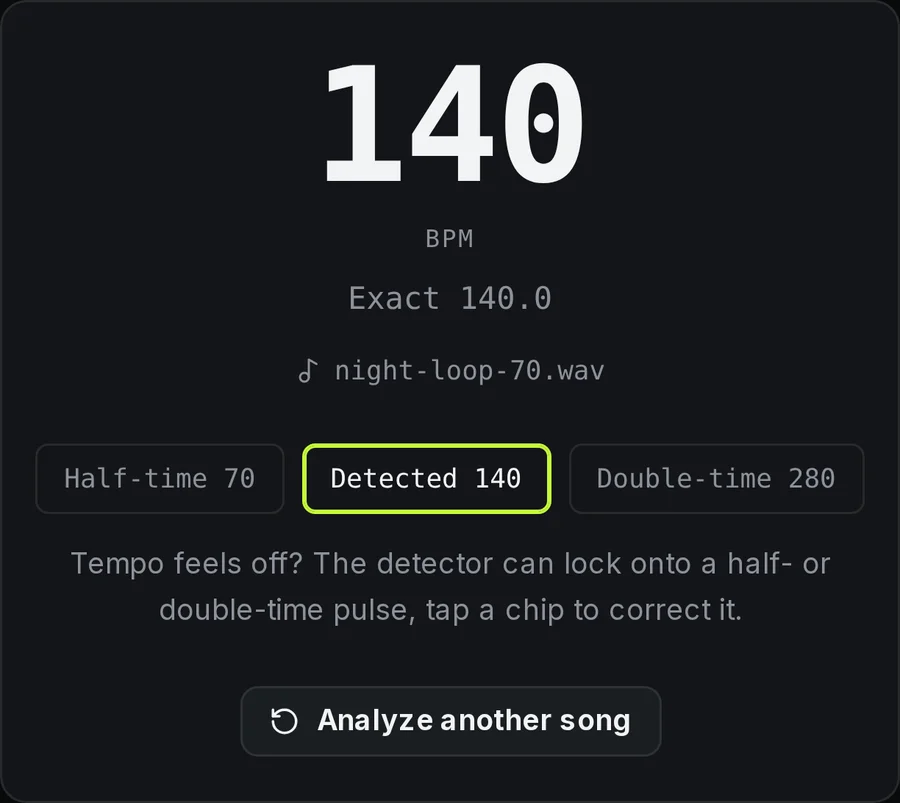
02Read the number
A few seconds later the tempo appears, here 140 with Exact 140.0 and the three chips.
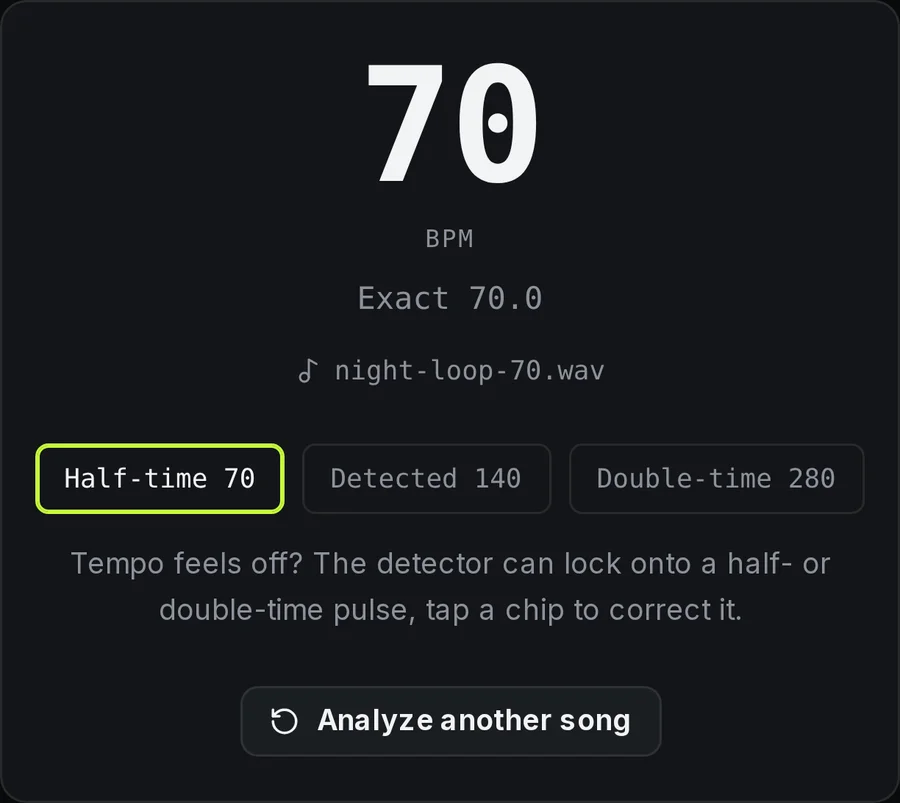
03Fix the octave
The loop felt slow, so Half-time turns the reading into 70. Analyze another song starts over.
The BPM of a song next to the beat styles that share it
Once you have a number, this table shows which beat styles live near it. Each name opens a drum machine already set to that groove.
| Style | BPM | Feel at that tempo |
|---|---|---|
| Lo-fi | 70-90 | Dusty, swung, laid back |
| R&B | 80-95 | Smooth, room for long vocal lines |
| Boom bap | 85-95 | Hard kick and snare, a little swing |
| Reggaeton | 90-100 | The dembow pattern, steady and bouncing |
| Afrobeats | 100-115 | Rolling percussion, relaxed swing |
| House | 120-128 | Kick on every beat |
| Phonk | 125-140 | Cowbell and distorted 808 |
| Trap | 130-150 | Half time snare, rolling hats |
| Jersey club | 135-145 | Kick bursts and bed squeaks |
| Drill | 138-145 | Late snare, sliding bass |
| Drum and bass | 170-175 | Fast breaks over slow bass |
Lots of styles overlap, so a number alone will not name a genre. For the full list, browse every genre with its own drum machine.
Files that fool a tempo detector, and what to do about each
Most odd readings have a plain cause. Run down this list before you set a whole session to the number.
- The number is half or double what you feel: tap the Half-time or Double-time chip.
- The song speeds up or slows down: you get one overall value, not a tempo map, so measure the part you need on its own.
- Live drums, a long intro or a section with no drums: cut a stretch where the beat is clear and measure that.
- The file will not open: browsers differ, so convert it to MP3 or WAV and drop it again.
Want the key from the same file too? Use the page that can find the musical key of an audio file, which reads the tempo alongside it.
Carry the BPM finder reading into the drum machine
A tempo is most useful the moment you start building on it. Type the number into the BPM field of the drum machine, set a groove from the style row, and program drums that sit right on the original song.
Got your number? Put it in the BPM box and start a pattern at the song's tempo.
Open the beat makerEverything there runs on the same page too, so you can make a beat in your browser and download it as MIDI or WAV with no sign up.
BPM finder questions
Can I look up a song by its title?
No. The BPM finder only measures a file you already have; there is no search by song name or artist.
Can I paste a YouTube or Spotify link?
No, links are not accepted. Drop an audio file you own, such as an MP3 or WAV.
Is my song uploaded anywhere?
It is not. Decoding and beat detection both happen inside this tab, so the song stays on your computer or phone, and there is no login step.
Why is the reading half of what I hear?
The detector locked onto every other beat, or onto every eighth note in the opposite case. Tap the Double-time or Half-time chip and the main number switches to the one that matches your foot.
Can it give me the key as well?
Not on this page. The key finder reads the key, its Camelot code and the BPM from one drop.